

One of the first things you should do before conducting your ancestral research is make a Pedigree Chart. This can be your starting point and once that is done then start making your Family Group Sheets.
Pedigree charts are invaluable tools for genealogical research, helping you visualize and understand your family’s lineage. While there are pre-designed pedigree charts available for download, creating your own can provide a personalized touch and cater to specific needs. In this blog post, we’ll explore where to download charts and provide a step-by-step guide on how to make your own pedigree chart.
Where to Download Pedigree Charts:
Before diving into creating your own chart, it’s worth mentioning that there are various websites and software programs where you can download pre-designed pedigree charts. Some popular options include:
1. FamilySearch: FamilySearch.org offers a range of free printable pedigree chart templates in different formats and styles.
2. MyHeritage: MyHeritage.com provides both free and premium downloadable pedigree charts, allowing you to customize and print them according to your preferences.
3. Ancestry: Ancestry.com also offers free downloadable pedigree charts in PDF format, which can be filled in digitally or printed out for manual completion.
Creating Your Own Pedigree Chart:
If you prefer a more hands-on approach and want to create your own pedigree chart from scratch, follow these steps:
Step 1: Determine the Format:
Decide whether you want to create a digital chart using software or a physical chart on paper. Digital charts allow for easier editing and sharing, while physical charts provide a tangible representation of your family tree.
Step 2: Select a Design:
Consider the level of detail you want to include in your chart. Choose a design that suits your preferences and provides ample space for names, dates, and additional information. Simple, clean designs often work best for readability.
Step 3: Gather Information:
Collect accurate and comprehensive information about your family members, including full names, birth dates, marriage dates, and any other relevant details. Use official records, family interviews, and genealogical research to ensure accuracy.
Step 4: Determine Generations:
Decide how many generations you want to include in your chart. Start with yourself and work backward, including parents, grandparents, great-grandparents, and so on. This will determine the size and complexity of your chart.
Step 5: Sketch the Chart:
If you’re creating a physical chart, use a large piece of paper or a poster board. Begin by drawing a square or a circle to represent yourself or the person you are starting with. Connect the squares or circles vertically for parents and horizontally for siblings. Continue the pattern for each generation.
Step 6: Add Information:
Write the names, birth dates, and any other pertinent details inside each square or circle. Use a consistent format for dates (e.g., dd/mm/yyyy or month/day/year) and ensure legibility.
Step 7: Enhance the Chart:
Consider using color coding or symbols to represent different branches of the family or to denote specific information, such as deceased individuals or adopted members. This can aid in visual clarity.
Step 8: Review and Update:
Regularly review and update your pedigree chart as new information becomes available. This will ensure its accuracy and maintain a comprehensive representation of your family’s history.
Using Canva to Create Your Pedigree Chart
If you have a Canva account, you can use Canva to create your pedigree chart. Canva is a versatile graphic design tool that offers various templates and customization options.
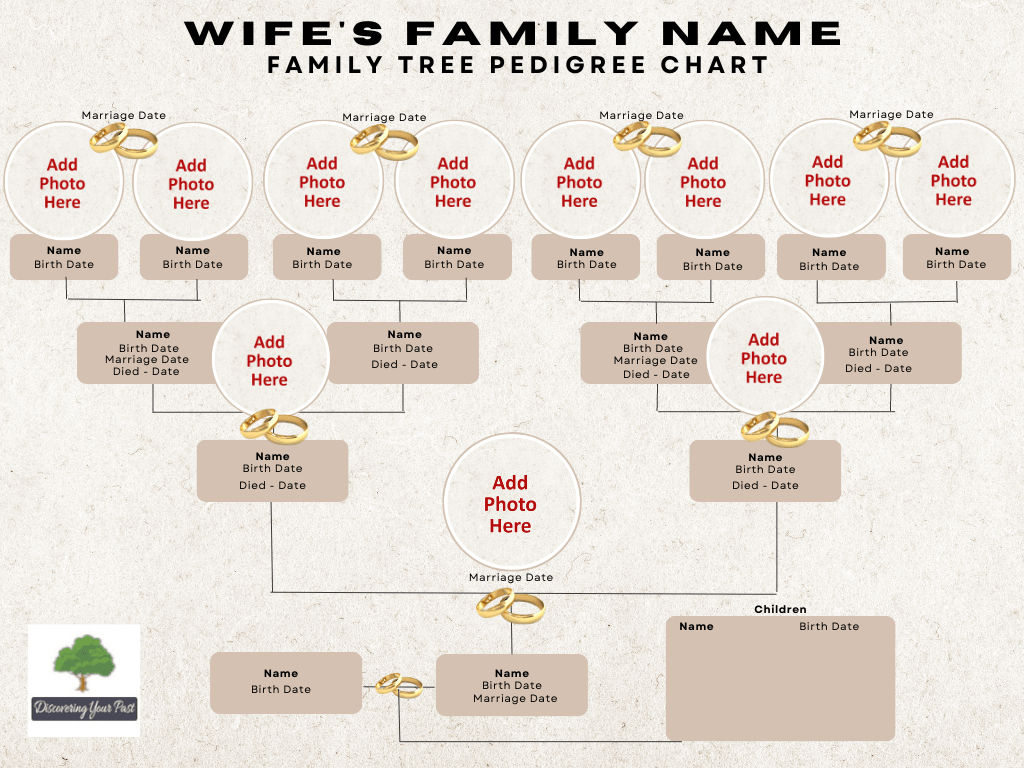
I created a family tree ‘Pedigree Chart’ and I was quite impressed with what I made in a matter of 2 hours. Anyone can make one and they can call it their own.

Here’s a step-by-step guide on how to make a pedigree chart using Canva:
By following these steps, you can create a personalized and visually appealing pedigree chart using Canva, showcasing your family’s lineage in a professional and creative way.
1. Sign up and Log in: Visit Canva’s website (canva.com) and create an account or log in if you already have one.
2. Choose a Template: Once you’re logged in, search for “pedigree chart” in Canva’s template library. Browse through the available options and select a template that appeals to you. Alternatively, you can start with a blank canvas and create your own design from scratch.
3. Customize the Template: After selecting a template, you can customize it to suit your needs. Double-click on each element to edit the text and replace it with the names, dates, and other information of your family members. Canva offers various font styles, sizes, and colors to choose from, allowing you to personalize the chart.
4. Add Shapes and Lines: To represent the connections between family members, use Canva’s shape and line tools. Add squares or circles to represent individuals and use lines to connect them vertically for parents and horizontally for siblings. You can adjust the size, color, and thickness of the shapes and lines as desired.
5. Incorporate Colors and Images: Canva provides a wide range of color options and allows you to upload images to enhance your chart. Consider using color coding to differentiate generations or branches of the family. You can also include photos of family members to make the chart more visually appealing and personal.
6. Include Additional Information: If you have additional details to add, such as birth dates, marriage dates, or other notes, Canva’s text and shape tools allow you to incorporate these elements. You can position them near the respective individuals or use callout boxes to provide additional context.
7. Review and Finalize: Once you have added all the necessary information and made desired customizations, review your pedigree chart for accuracy, legibility, and visual appeal. Make any necessary adjustments or edits to ensure everything is in order.
8. Save and Export: Once you are satisfied with the final result, save your pedigree chart in Canva. You can download it in various file formats, such as PDF or JPEG, depending on your intended use. You can also choose to print it directly from Canva or share it digitally with your family members.
Creating your own pedigree chart can be a rewarding experience, allowing you to visually map out your family’s heritage and preserve it for future generations. Whether you choose to download a pre-designed chart or create your own from scratch, the key is to ensure accuracy, organization, and clarity. By following the step-by-step guide provided in this blog post, you’ll be well on your way to creating a personalized pedigree chart that serves as a treasured keepsake of your family’s lineage.
Below is 2 sample Pedigree Charts, one for the husband’s family and one for the wife’s family. Let your imagination go and see what you can come up with.
Let me know your creations! These Pedigree Charts were fun to make, get your kids involved and make a unique family chart.

 Discovering Your Past